
Groups & cohorts
One app, more than one audience.
Groups decide who sees what. HCCB Partners Meet 2026 mapped every guest to Partners or Employees, each with its own content. The Tanvi & Rutwik wedding app, a Pune wedding in preparation, asks guests to pick bride’s side or groom’s side. Notices, polls, feeds and chat rooms can each be scoped to a group.
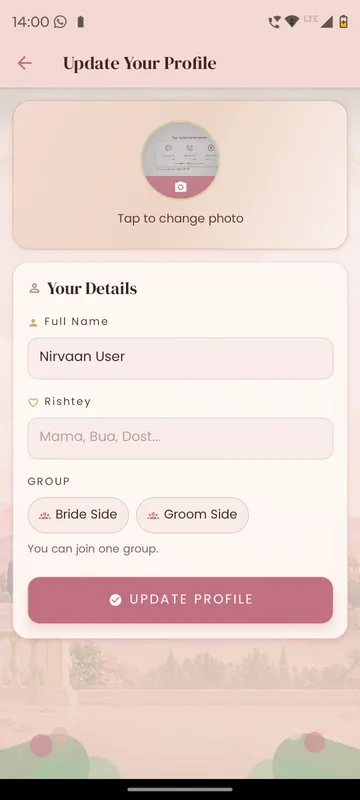
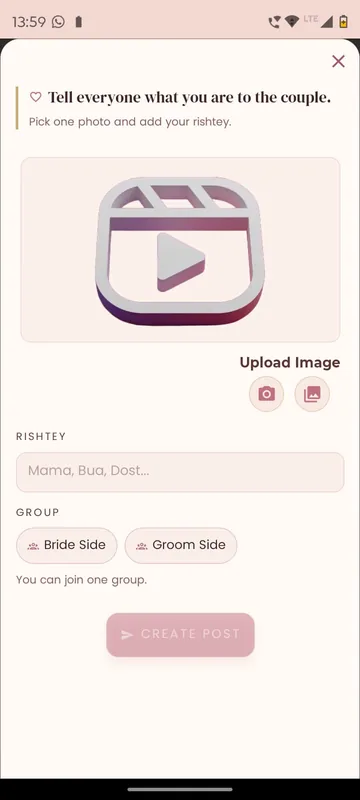
Right message, right people
Send a notice to one side, one team or one zone without bothering everyone else.
Safe by default
A guest not yet mapped to a group sees only Home and Profile.
Results per group
Poll results and participation can be read group by group.
How it works
How it works
Set the groups
Import them from your list, derive them from a field such as zone, or let guests pick.
Scope each module
Feed, polls, notices and chat each take their own group setting.
Choose an audience every time
When scheduling a notice or a poll, pick everyone or selected groups.
Fits these occasions
Where it earns its place
Works with
Pairs well with
Included in
Event & Hospitality
Everything your guests need, and nothing your team has to chase.
FAQ
Common questions
Can guests choose their own group?
Where you allow it, yes, as wedding guests do when picking a side. Otherwise groups come from your list.
What does an unmapped guest see?
Only Home and Profile, until your team maps them. It is the safe default.
Does every module respect groups automatically?
Each module has its own group setting, so we configure and test feed, polls, notices and chat one by one.
Can a team have its own chat?
Yes. Team Chat gives each group a private room, as YEC 2024 did for its teams in Dubai.
Map your audiences.
Tell us who your groups are. We will show you what each one sees in the same app.