
Features
Every feature, grouped by the job it does.
Switch on the modules your event needs and leave the rest off. Each one works in the branded app, the admin panel and, where it helps, on the web and the venue screen.
Your branded app
Your name, colours and artwork on iOS and Android, with home tiles, banners, a countdown and a welcome video.
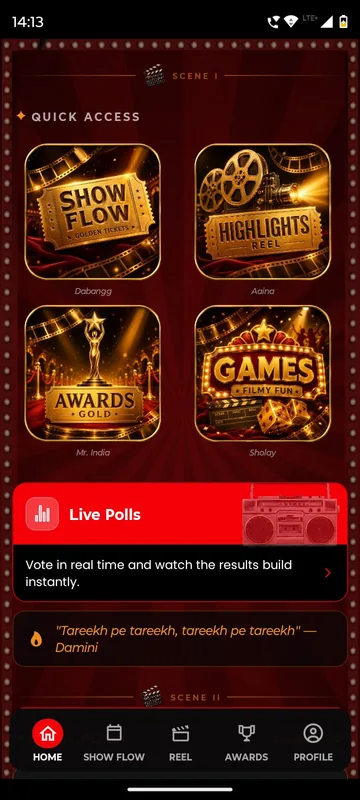
Overview- Branding, home tiles & layoutEvery app carries your logo, colours, banners and welcome video. Its sections can be renamed to match the theme: Show Flow and Reel for a cinematic partners meet, Xplore and Xcite for enGen X, JSAgenda for a Jaipur offsite. Home tiles can be shown, hidden, ordered or locked until their moment.
- Pinned notices, banners, countdown & welcome videoLead the home screen with what matters now: a welcome video before arrival, a countdown in the last days, a pinned notice or a NOW LIVE strip when the day starts. HCCB Partners Meet 2026 put an ACTION IN countdown beside what was showing next; the Tanvi & Rutwik wedding app, in preparation, counts down beneath a note from the couple.
Login and guest lists
Guests sign in the way your list already works: phone or WhatsApp OTP, delegate ID and PIN, employee code or an event code.
Overview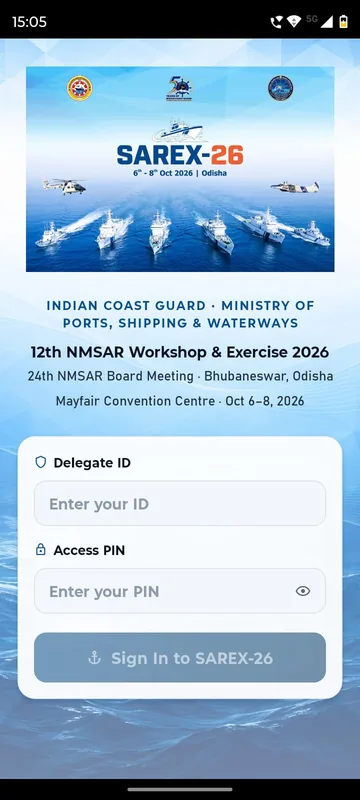
- Phone, email & WhatsApp OTP loginGuests type their registered phone number or email, receive a one-time code and are in. You choose the channels per event: phone, email, or WhatsApp where your provider account is connected. GCOO Conclave 2026 accepted mobile numbers only; HCCB Partners Meet 2026 let international partners use email instead.
- Delegate ID + PIN loginFor workshops and board meetings where not every delegate shares a mobile number or email, each one receives a Delegate ID and an Access PIN from your delegate list. SAREX-26, the Indian Coast Guard workshop in Bhubaneswar, used it as the main sign-in, with OTP beside it and a request-access route for anyone without credentials.
- Employee code & company-domain loginThe app opens the sign-in your programme uses: employee ID and password, or a company email with a one-time code. Tiger15 then showed a Confirm it’s you card with name, employee ID and location, with Continue or Not me. Employee code, city and zone can also be collected as profile fields, as Unstoppable NAMI 2026 did, to drive groups and reports.
- Guest lists, whitelists & registration reviewAccess starts from your list, not the app store. Import the phone numbers or emails you have invited, allow your company’s email domains, or let people request access and approve each one. At the APMI conference anyone not on the registration list saw Access Not Available; at HCCB Partners Meet 2026 every listed number was also mapped to its group.
- Occasion codes & attendee codesAn event code adds an event to a guest’s app: tap Join with Code, type it, or scan the QR on an invite or poster. A personal unique code signs one participant in without waiting for an SMS, as Growth Code did. Codes are generated in the admin panel and handed out by your team.
Agenda and information
Day-wise agenda with what is on now and next, speakers, sponsors, venue maps, FAQs, dress codes and documents.
Overview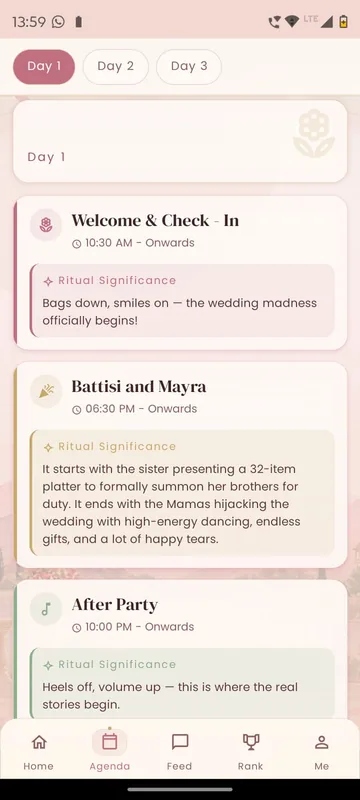
- Agenda, Show Flow & Live / Up NextPublish the programme as day tabs with times, venues and notes, or as posters and PDFs when that is how your team already designs it. Call it Show Flow, Programme or Itinerary. The running session and the next one can sit right on the home screen.
- Information pages, FAQs & documentsMost guest questions are answered by a page: about the city, the venue, what to pack, the weather, safety and FAQs. Unstoppable NAMI 2026 kept them under one Information tab. SAREX-26 added a protocol guide that stays on the phone after the first open, and GCOO Conclave 2026 published safety and social media guidance.
- Speakers, artists, committee & dignitariesPublish speakers, dignitaries, artists and committee members as profiles with photo, role, company and biography, grouped under headings you choose. The APMI conference grouped its dignitaries by category; the Bengaluru Wedding Fraternity Meet Up gave Speakers, Artists and Committee their own tiles. Growth Code kept a speaker blurred with “Identity reveals live on stage”.
- Sponsors & partner zonesSponsor logos sit on Home and on a Sponsors page, grouped by the tiers you sold. The APMI conference showed platinum and gold sponsors on Home; EEMA Connect grouped co-sponsor, powered-by and official hospitality partners, and added a Sponsor Zone that opens onto exhibitor stalls.
- Venue maps & seatingPublish venue maps, floor plans by area and seating charts as pages your team can replace at any time. GCOO Conclave 2026 showed both hotels with a View button to the phone’s maps; HCCB Partners Meet 2026 published hotel zones and the banquet seating; SAREX-26 mapped a sightseeing route with a Navigate link.
- Style guide, dress code & do's and don'tsPublish dress codes per function or evening, travel advisories and conduct notes as pages. HCCB Partners Meet 2026 paired a Bollywood style guide with a Goa travel advisory; Unstoppable NAMI 2026 illustrated a look for each evening; Occasion Xperts listed wedding etiquette. Each page can stay locked until its day.
Hospitality and travel
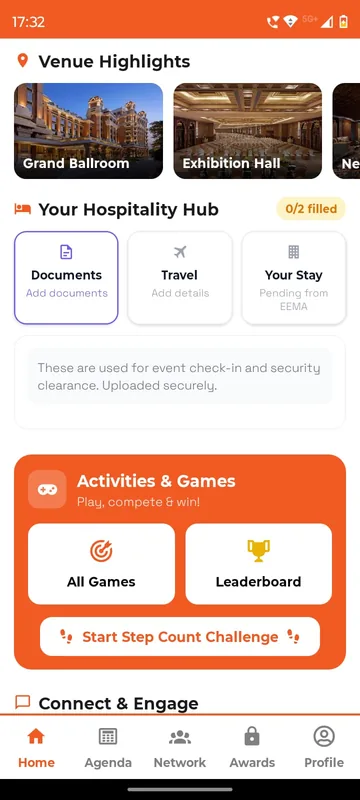
Collect flights, PNRs (airline booking references), ID proofs and room preferences in the app, then publish each guest’s own stay, pickup and contact.
Overview- Hospitality requests & My StayCollect travel details and ID proofs inside your event app, then send each guest their own stay, flight and pickup. Your travel desk stops chasing spreadsheets. Your guests stop calling.
- Live operations workspace & exception handlingYour hospitality team works from one live sheet: each participant’s ID, PNR, flights, room, pickup and driver, each field pending, provided or verified. The hotel desk, transport lead and liaison officers each see their own slice. At GCOO Conclave 2026, with delegates split across two Jaipur hotels, the desk reconciled arrivals against PNRs before they landed.
- Help desk, SOS, emergency contacts & phrasebookGuests reach your help desk by call, WhatsApp or email, or raise a request with a category and photos and follow it from open to closed. SAREX-26 put help, the liaison officer and emergency contacts behind an SOS entry on Home, plus a phrasebook in 43 languages that works offline. HCCB Partners Meet 2026 listed the control room, the hotel and the nearest hospitals.
Polls, quizzes and feedback
Live polls, quizzes and word clouds on phones and on the venue screen, plus session feedback when it is fresh.
Overview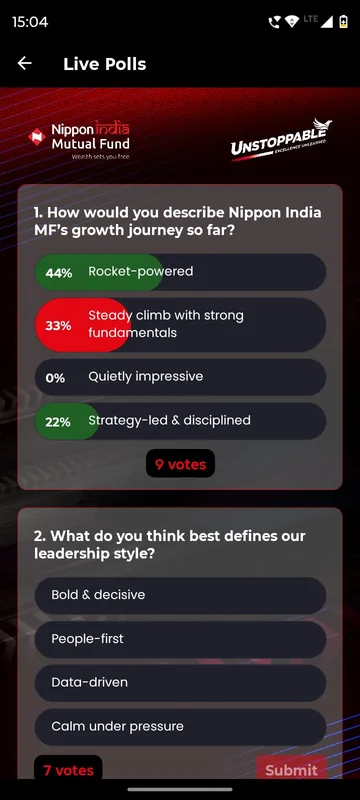
- Live polls & votingPush a question live from the panel or a Manager’s phone. Guests vote in the app, and anyone without it scans a QR code and votes in the browser. Results add up in one place and can be shown on the venue screen. APMI asked delegates what influences an investor’s choice of portfolio manager; Growth Code asked what would make the business future ready.
- Quizzes & live triviaAn Owner or Manager writes questions in the app, marks the correct option and keeps each one hidden until the moment. During the session they switch a question on and the room answers on their phones, with scores going to the unified leaderboard. Lakshya 26 ran its quiz this way; Unstoppable NAMI 2026 named it Nippon Quiz.
- Feedback forms & session feedbackA Feedback tile opens your own form, and session feedback cards stay locked until each session has happened, so ratings follow the talk rather than arriving as one vague survey a week later. SAREX-26 asked about overall experience, organisation and the usefulness of sessions.
Feed, photos and Smart Lens
A private social feed, albums and reels, and Smart Lens: one selfie finds every photo a guest appears in.
Overview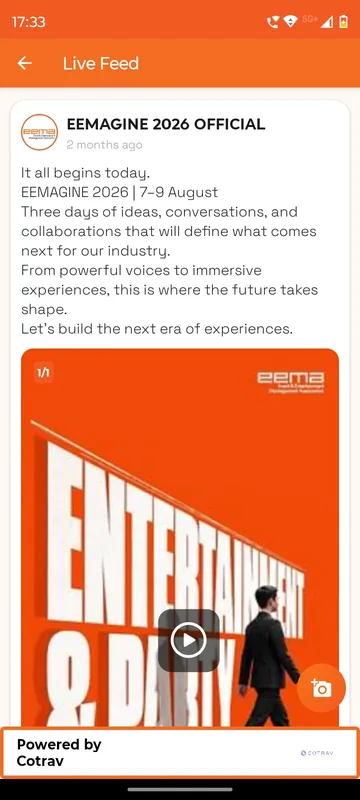
- Social timeline & feedGuests post up to five photos or one video with a caption and hashtags, and others like, comment and share. It goes by many names: Socials at the Bengaluru Wedding Fraternity Meet Up, Moments at GCOO Conclave 2026, Live Feed at EEMA Connect. Your team decides whether guests can post and can remove anything.
- Gallery albums, moderation & download controlsPublish albums by day, session or function, with photo and video tabs. Guests can add their own where you allow it, and your team decides whether images can be saved. Lakshya 26 called it Memories, Unstoppable NAMI 2026 called it Highlights and put Smart Lens beside the albums.
- Reels & photoboothPost short videos and photos to a reels strip at the top of Home, with captions and hashtags, likes, comments and sharing. HCCB Partners Meet 2026 called it Reel; Lakshya 26 let permitted attendees add their own. On the guest side, a framed selfie opens the camera, adds one of your branded frames and uploads it.
- Social-media wall with approvalThe wall collects public posts made outside the app that use your event hashtag or come from named profiles. Each post arrives as a candidate in the admin panel and appears on the wall only after your team approves it, so an off-topic post never reaches the screen in the hall. It is separate from the in-app feed.
Games and activations
Bingo, trivia, Who Am I, treasure hunts, AR cards and custom branded games that keep people moving between sessions.
Overview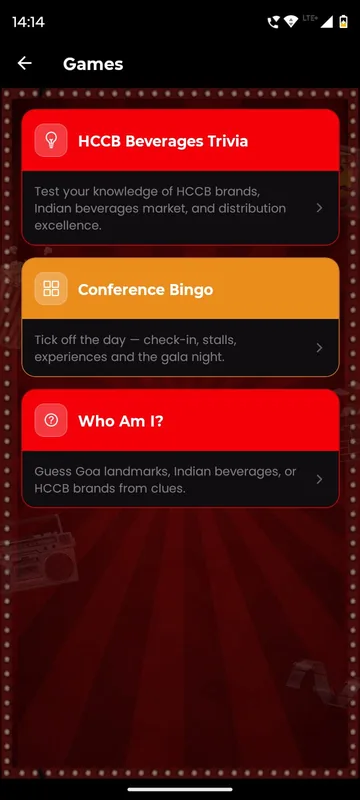
- Games library (15+ game types)Choose from ready formats: trivia, bingo, Who Am I, Sudoku, crosswords, riddles, jigsaws, memory games and Mad Libs. Your questions, clues and images go in; points flow to the leaderboard. HCCB Partners Meet 2026 played brand trivia and conference bingo; SAREX-26 built a bingo card of workshop moments.
- Custom branded gamesA KBC-style quiz show, a branded Pacman, Snakes and Ladders, or a two-player AI image challenge: each is designed in your colours and content. It runs on the same engine as the games library, so sign-in, timers, scoring, leaderboards and operator controls are already in place. Every custom game is built per event and scoped with your team.
- Treasure hunts, QR scavenger hunts & AR cardsA hunt is a set of physical markers linked to the app. Participants scan a QR code or hold a printed card up to the camera, and the app opens a clue, a question or an augmented reveal, recording who found what and when. The Jharokha Sangam in Jaipur ran Lukka-Chippi, a hunt for printed palace-themed cards.
Points, steps and rewards
One leaderboard for everything people do, team boards, badges and streaks, step challenges and a reward store.
Overview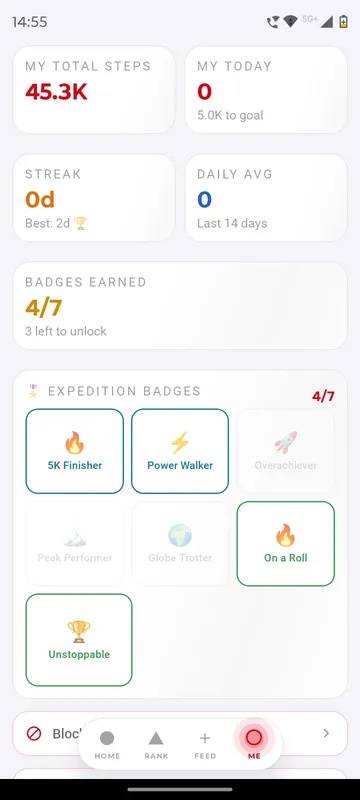
- Unified leaderboard & team boardsQuiz answers, QR scans, step syncs, games and feedback all post points to the same board. Participants see their overall rank, then filter by day, game or activity, and switch between individual and team views. Tiger15 called it the Tiger League; The Jharokha Sangam ranked steps and games together as Sangam Ke Sikandar.
- Badges, streaks & tiersSet the milestones that matter for your programme, such as a daily step target, a run of days or a weekly goal, and participants earn badges they can see on their profile. The HSBC Wellness Expedition showed seven named badges; The Jharokha Sangam called them medallions.
- Step challenges with Health Connect & Apple HealthParticipants connect Health Connect on Android or Apple Health on iPhone and sync their steps. The app shows today, total, average and best day, team progress and weekly pace. The HSBC Wellness Expedition ran it for teams over several weeks; The Jharokha Sangam turned team steps into a walk through palace milestones. Hand-entered steps do not count.
- Points wallet & reward storeWallet points are the balance a participant can spend; leaderboard points record what they achieved, and spending never lowers a rank. The store lists items with a points price, live stock and a per-person limit. At Tiger15, staff scanned each pass at the counter and saw the reward, points spent and balance left. Integrity Champ ran its Well Done rewards all year.
- Awards, nominations & jury votingAn Awards tab lists each category with its nominees and how they were selected. When your team publishes the results, winner cards replace the nominees with photo, name and category. HCCB Partners Meet 2026 ran it as a bottom tab. Awards pages, nominations and jury steps are set up on request for each event.
QR entry and attendance
A personal QR for every guest. Scan for entry, dinners, buses and booths, with time windows and repeat-scan rules.
Overview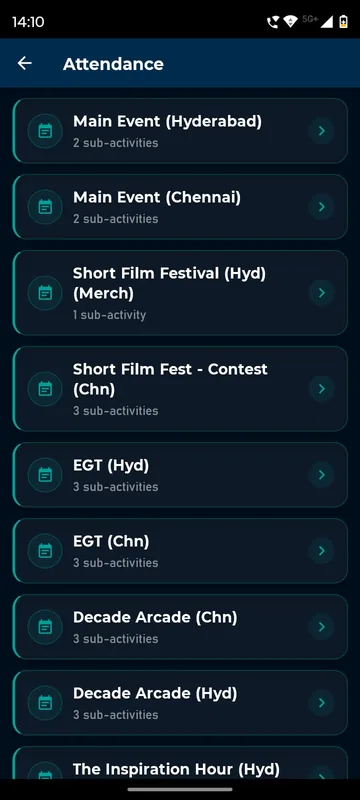
- Entry pass & personal QREach guest has a personal QR in the app, shown as an entry pass, a networking card or a QR pass. The same code works at the gate, at sessions, at exhibitor stalls and at the reward counter, because it always points to the same person. Staff scan it from the organiser tools on their phone.
- QR attendance & activitiesSet up each activity, such as Day 1 entry, the gala dinner or the return bus, with the rules it needs. Decide when it is open, which groups are eligible, and how many scans are allowed in what order. Managers scan a guest’s QR from their phone or add them by email or phone. enGen X counted entries and merchandise handovers city by city.
Tickets, stalls and bookings
Sell tickets and meeting-room slots with Razorpay, run exhibitor stalls with lead capture, and issue GST invoices.
Overview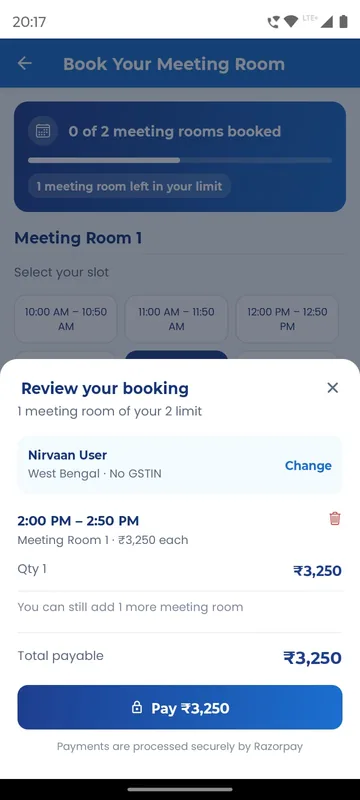
- Tickets, Razorpay payments & invoicesTicket types carry a price, a purchase flow and an access rule. Buyers pay by Razorpay in the app or from a web link, and a successful purchase creates their membership and unlocks what the ticket allows, including the entry pass. Billing details carry through to the GST invoice, as on the APMI conference’s paid bookings.
- Meeting-room & time-slot booking with paymentAt the APMI 3rd Annual Conference in Mumbai, delegates tapped Book Your Meeting Room on Home and picked a room and one or more hourly slots. They entered billing details for the GST invoice and paid through Razorpay. Booking Confirmed appeared in the app and by email, and each guest had a booking limit.
- Exhibitor My Stall & lead captureVisitors browse stalls, bookmark them, scan a stall’s QR to record a visit and leave a review. Exhibitor staff open My Stall to scan a visitor’s QR, add a note and see stall scans, unique visitors and leads in one place. The Bengaluru Wedding Fraternity Meet Up and EEMA Connect both ran it.
Messaging and networking
Push, email and WhatsApp to the right group at the right time, plus 1:1 chat, group chat and a delegate directory.
Overview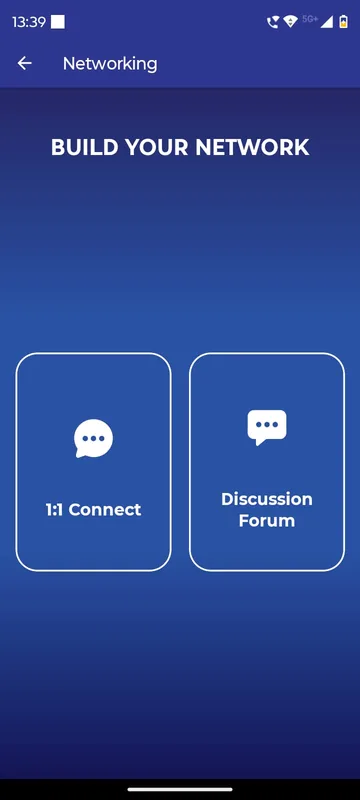
- Push & scheduled announcements by groupOwners and Managers open Trigger Notifications on their phone, write a title and message, pick a date and time and choose Send To All or Select Group. Each one arrives as a push and stays in the app’s updates list. GCOO Conclave 2026 used it for PNR and web check-in updates; HCCB Partners Meet 2026 for reminders before the awards.
- 1:1 chat, group chat & discussionA first message to another guest is a chat request; the conversation opens only when they accept, and anyone can be blocked. Teams can get their own chat room, and a discussion board with mentions gives the whole event one place to talk. Chat can stay locked until a guest has registered.
- Delegates directory & QR contact exchangeDelegates search the attendee list, read a profile and send a chat request that opens only when accepted. In person, each delegate shows a personal QR, called a Networking Card at GCOO Conclave 2026 and My QR Code at the Bengaluru Wedding Fraternity Meet Up, and a scan adds the contact.
- Groups & cohorts (group-scoped content)Groups decide who sees what. HCCB Partners Meet 2026 mapped every guest to Partners or Employees, each with its own content. The Tanvi & Rutwik wedding app, a Pune wedding in preparation, asks guests to pick bride’s side or groom’s side. Notices, polls, feeds and chat rooms can each be scoped to a group.
Admin panel and reports
Your team runs the event from a web admin panel and an in-app dashboard, then exports everything to Sheets or Excel.
Overview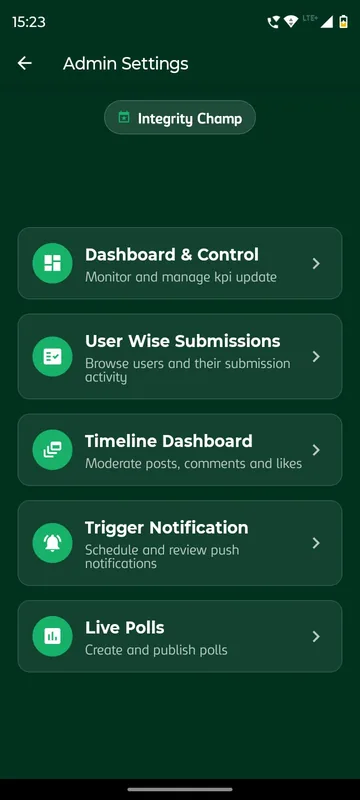
- Admin panel, roles & feature switchesA web admin panel decides what is on, how it behaves and how it looks for each occasion. Inside the same app, Owners and Managers get extra buttons on their profile to take attendance, send notices and run polls from the floor, while guests see only what you have opened for them.
- Reports & exportsEach event’s data exports by module: attendance with scanner and time, game and score results, daily steps, hospitality status per guest, ticket sales and invoices. Large exports run in the background and arrive by email; the same data can flow to Google Sheets, Airtable or a webhook. Admin actions are logged for review.
- Multi-event & agency appsGuests install once and join each event by typing a code or scanning a QR. Every event keeps its own colours, tiles, hospitality and networking, and organisers keep their roles event by event. Occasion Xperts runs it as an agency app, EEMA Connect for an association, and Nirvaan as the lightest shell.
- Organiser-approved AI session summariesMembers open a session and read its key points. Each summary is drafted by AI and stays hidden until an organiser approves, edits or rejects it, and the app records who approved it and when. EEMA Connect ran it as an AI Session tile for its members.
More features
Specialist modules for particular occasions and integrations.
- I-Am-Attending poster generatorWhen attendees first open the app they add a profile photo, and the app makes a personal I Am Attending poster with it in your event’s design. They save it to the phone and post it on social media. The Bengaluru Wedding Fraternity Meet Up 4.0 used it to spread word through the trade before the day.
- Member imports & profile fieldsWe import your spreadsheet as members and carry the profile fields you care about. For Unstoppable NAMI 2026 that was employee code, city and zone; for the Bengaluru Wedding Fraternity Meet Up, up to two of 17 business categories. enGen X added a This is me step, where each person confirms the registered record or taps Not me.
See it working
Try a feature before you buy it.
Vote in a live poll, scan a QR pass or open a guest’s My Stay card on sample data, right in your browser.
Tell us your event. We’ll switch on the right features.
A 20-minute walkthrough set up with your occasion, then an itemised quote within one working day.