
Delegate directory
Find the right person in the room, and keep their card.
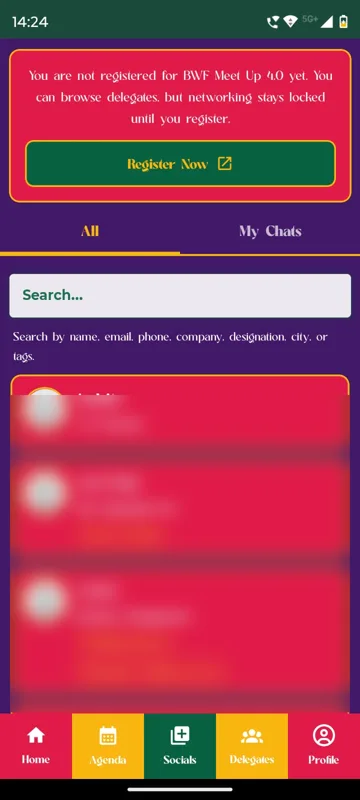
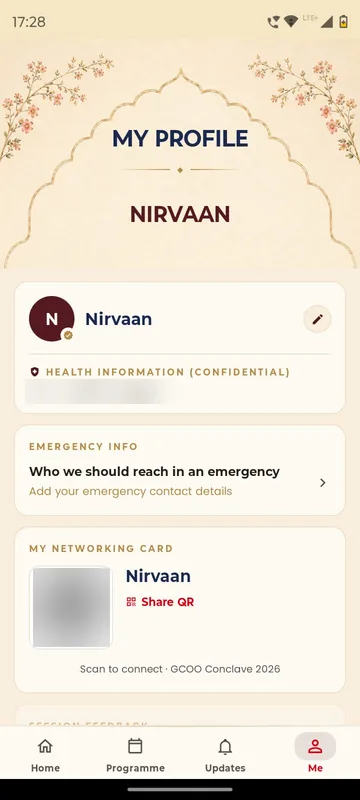
Delegates search the attendee list, read a profile and send a chat request that opens only when accepted. In person, each delegate shows a personal QR, called a Networking Card at GCOO Conclave 2026 and My QR Code at the Bengaluru Wedding Fraternity Meet Up, and a scan adds the contact.
Search by what matters
Name, company, designation, city or business category, depending on the fields you collect.
Cards without paper
One scan of a personal QR swaps details at a stall or a dinner table.
Networking on your terms
Keep the directory locked until registration, or open it to ticket holders only.
How it works
How it works
Profiles from your list
Delegates appear with the profile fields you choose, which they can edit.
Search and request
A delegate finds someone and sends a chat request; it opens once accepted.
Scan to connect
Face to face, scanning the personal QR adds the contact.
Fits these occasions
Where it earns its place
Works with
Pairs well with
Included in
Event & Hospitality
Everything your guests need, and nothing your team has to chase.
FAQ
Common questions
Can visitors who have not registered see the list?
You choose. At the Bengaluru Wedding Fraternity Meet Up, unregistered visitors could browse but had to register before networking unlocked.
Does it suggest who to meet?
No. The directory works on search, profile fields and groups. There is no AI matchmaking.
What does a QR scan share?
The delegate’s contact card, such as name, phone, email and designation, as set for the occasion.
Can someone hide from a person?
Yes. Members can block others, and Blocked Users shows who is blocked.
Make your delegates findable.
Tell us which profile fields matter for your audience. We will show the directory and the QR card in a demo app.