
Operations workspace

The desk behind every My Stay card.

Your hospitality team works from one live sheet: each participant’s ID, PNR (airline booking reference), flights, room, pickup and driver, each field pending, provided or verified. The hotel desk, transport lead and liaison officers each see their own slice. At GCOO Conclave 2026, with delegates split across two Jaipur hotels, the desk reconciled arrivals against PNRs before they landed.

Gaps before arrival day

See exactly whose PNR or ID is still pending, by group.

Each team, its own slice

Hotel, transport and liaison leads work the same sheet with their own permissions.

One fix, one guest

Correct a record and that guest’s card updates, with a notification if you want one.

How it works

How it works

  1. Load what you know

    Import the rooming list and travel sheet by CSV or Sheets.

  2. Reconcile

    Check what guests declared against arrival details; verify or flag each field.

  3. Handle exceptions

    Late changes and missing documents are worked from the flagged list.

  4. Publish to guests

    Verified arrangements appear on each guest’s My Stay and My Journey cards.

In your operations workspace

One sheet, every arrangement, every status

Rows are participants; columns are what you asked for. Your team filters by group or status, fixes a record and the guest’s card updates.

  • Pending, provided and verified per field, with who verified it
  • Scoped access for hotel, transport and liaison teams
  • Exceptions flagged when arrival, room or pickup stop matching
  • Rooming and participant lists imported by CSV or Sheets
Illustration

Hospitality, end to end

From a guest’s form to their own My Stay card.

  1. Guest app

    Guest sends details

    Flight, PNR, ID proof and room preference, answered on the phone.

  2. Hospitality desk

    Desk reconciles

    Each field marked pending, provided or verified. Clashes are flagged.

  3. Hospitality desk

    Desk publishes

    Room, pickup and liaison officer go to that one guest, not a broadcast.

  4. Guest app

    My Stay updates

    Hotel, room, cab and who to call, on the guest’s own card.

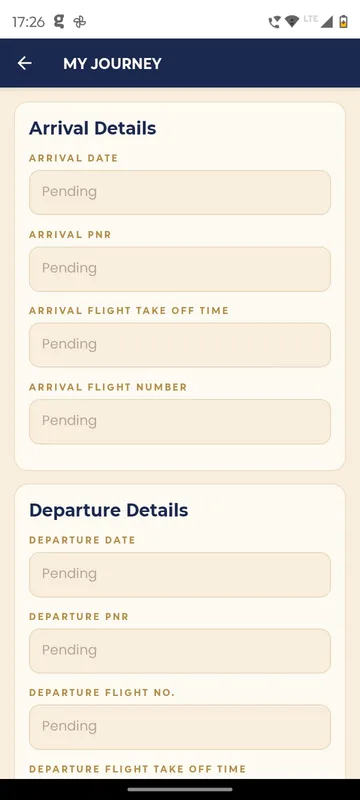
My Journey form with arrival and departure date, PNR, flight number and take off time fields, all in a pending state
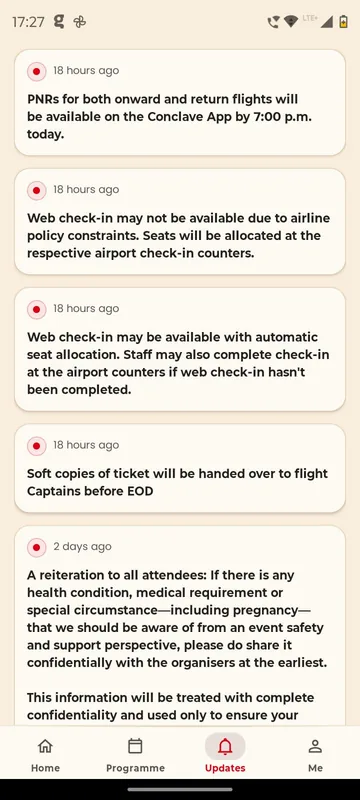
Updates feed with organiser announcements about PNR availability, web check-in, ticket hand-over and a confidential health information reminder

Customer story

GCOO Conclave 2026, Jaipur

Delegates split across Fairmont Jaipur and The Leela Palace Jaipur. PNRs, flights and pickups were reconciled on the desk and published to each delegate’s My Journey card.

“…A big thank you for creating our Conclave app and making the experience so seamless! Really appreciate your support, flexibility and patience in accommodating all our last-minute requests. …”
Sudarshana · Client team, GCOO Conclave 2026
Read the story

Fits these occasions

Where it earns its place

Works with

Pairs well with

Included in

Event & Hospitality

Everything your guests need, and nothing your team has to chase.

up to 500 people10–14 days
From ₹1,40,000 per event, plus GST

FAQ

Common questions

Do you book hotels or flights?

No. Sociana is the hospitality desk and guest self-service. Your team or travel partner books; we hold no hotel inventory.

Does it sync with the hotel’s system?

No direct hotel-system sync. Rooming lists come in by CSV or Sheets, and exports go back the same way.

Can vendors see only their part?

Yes. Team members and partners get scoped access to the rows and fields they need.

What about plus-ones and family members?

Companion and family details on a guest’s arrangements are set up on request for your event.

Show us your travel sheet.

Send an anonymised sample. We will show how it looks as a live desk and as each guest’s card.